
Every player. Every position. Every game.
Every position. Every game. Building a fair rotation for 14 kids used to mean a spreadsheet and 45 minutes. GameCard does it in seconds, so you can spend that time on the field, not in front of a screen.
Everything handled. Nothing to calculate.
Rotation Done Automatically
Goalkeeper: No Guesswork
Any Format, Ready to Go
See it in action.
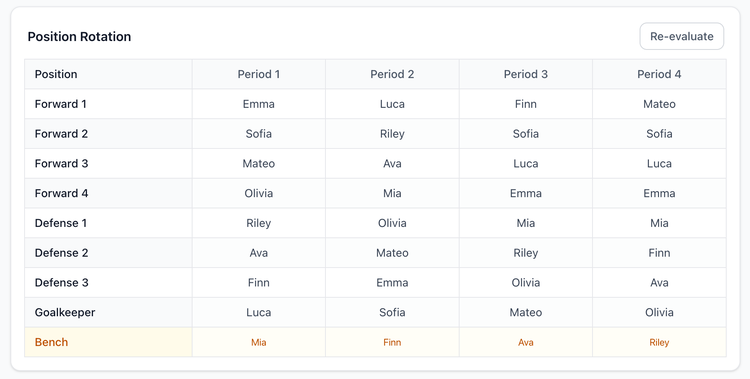
Fair position rotation, every game.
GameCard's algorithm is built to spread positions fairly across your roster. It knows each player's eligibility, rankings, and any performance updates, and uses built-in fairness rules to make sure no player gets locked into the same spot every game.
Bench time is handled too. Field time stays balanced across the whole team, consistently. No kid gets locked into one spot, and no kid carries more bench time than anyone else.
Every player in the right position.
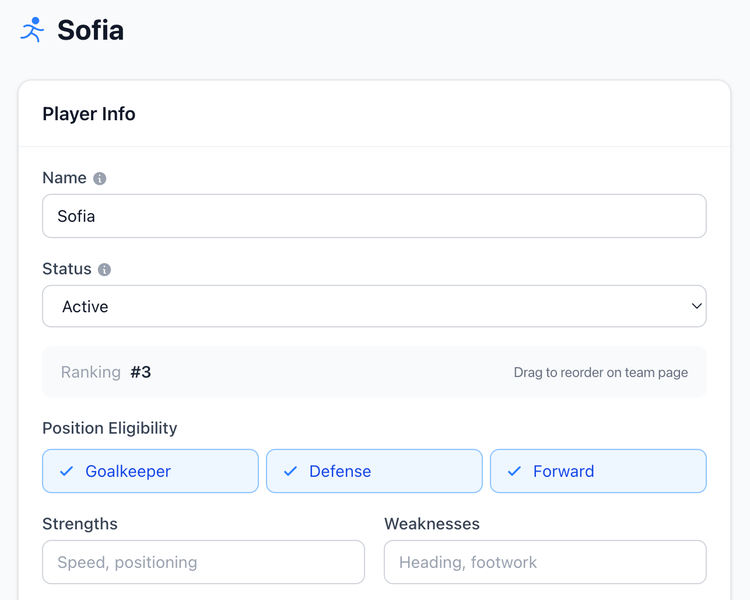
On each player's profile, you set which position types they're eligible for: goalkeeper, defender, midfielder, forward, or any combination. If a type isn't checked, that player is never scheduled there.
A forward who's never played keeper stays out of goal all season. A versatile player who can go anywhere rotates through everything. Set it once per player; the rotation respects it for every game, automatically.
Tell us your format. That's the hard part done.
Pick your format on team creation. GameCard sets up the right positions automatically and you set how many rotation periods per game you want. GameCard builds the full rotation grid from there.
5v5: Typically ages 5–8
1 goalkeeper + 4 field players. GameCard sets up positions (1 GK, 2 Defenders, 2 Forwards) and rotates all four fairly across your squad.
At this age, playing every position is the whole point. GameCard makes sure every kid touches every spot across the season, including goalkeeper, unless a parent has flagged otherwise.
7v7: Most common competitive youth format, typically ages 8–11
1 goalkeeper + 6 field players. Default positions: 1 GK, 2 Defenders, 3 Midfielders, 1 Forward. You can customize the exact names and lineup freely.
This is the format where goalkeeper rotation gets complicated, with enough players that GK duty can be spread fairly, but not so many that it's easy to track by hand. GameCard handles it automatically.
9v9: Typically ages 10–13
1 goalkeeper + 8 field players. Default positions: 1 GK, 3 Defenders, 3 Midfielders, 2 Forwards.
With 9 players on the field and typically 12–14 on the roster, substitution and rotation management gets real. GameCard tracks who's played where and builds the rotation around your full squad, including bench time.
11v11: Full format, typically ages 12+
1 goalkeeper + 10 field players. Default positions: 1 GK, 4 Defenders, 3 Midfielders, 3 Forwards.
At full format, position specialization starts to matter more, but so does fairness. GameCard balances your player rankings with fair rotation, so your strongest defenders anchor the back line while still giving everyone a full season of varied experience.
Coach from the touchline.
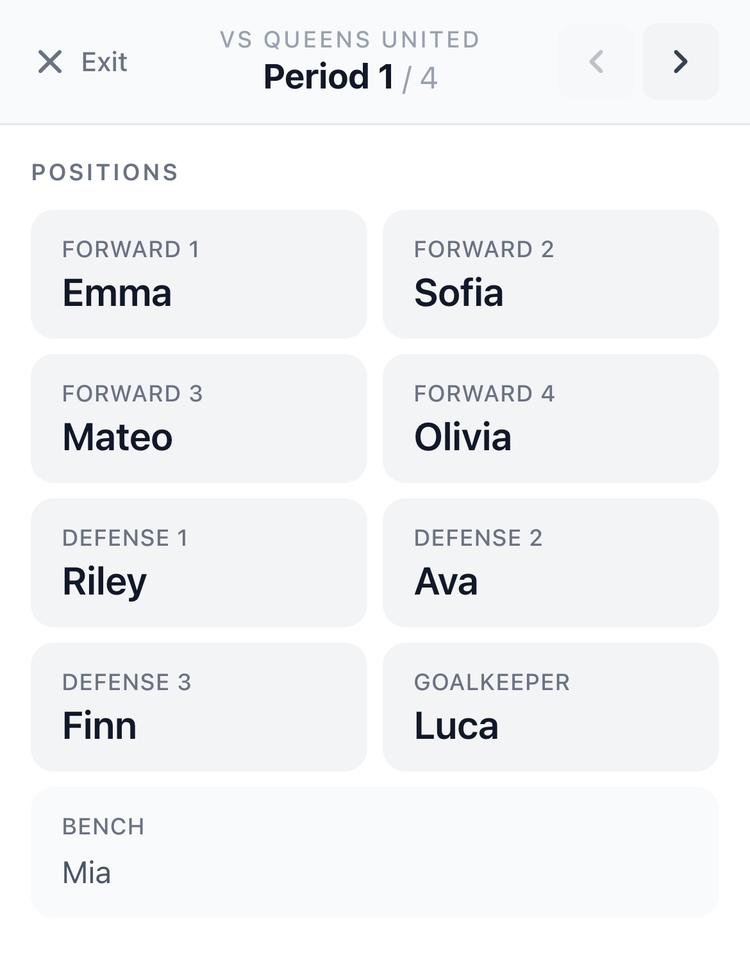
Tap Live on any game to open the full-screen sideline view. Big text, clear layout, no distractions.
See who plays what position each rotation, navigate forward with arrows, and always know your lineup at a glance. Your phone becomes your clipboard. No more paper that blows away in the wind.
Stop answering "what time is the game?"
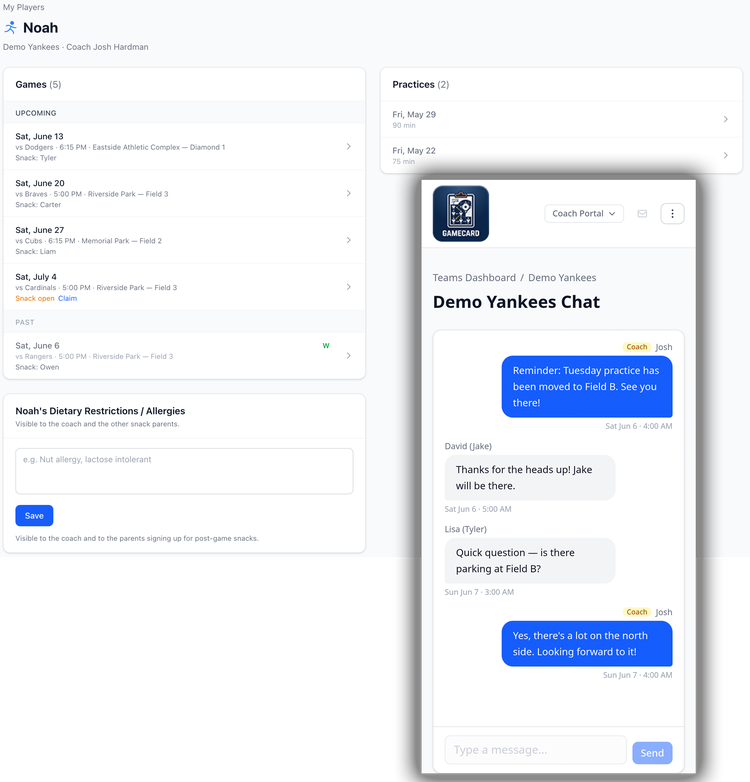
Parents get their own simple view: upcoming games, the lineup, practice schedule, snack sign-ups, and a real-time team chat. One invite link from your team page. They're set for the season.
Parents also get an automatic reminder the morning of every game and practice, so they show up without you having to send a thing. When they have a question, it goes in the team chat instead of your text messages. No more group texts on your personal phone. No login headaches.
15 minutes to set up. Under a minute per game after that.
1. Set up your team
Choose your game format (5v5, 7v7, 9v9, or 11v11). GameCard sets up the right positions automatically. Add your players, and mark any goalkeeper preferences for players who don't want to play keeper.
You only do this once. GameCard carries your setup all season.
2. Schedule your games
Add games with the date and which players are attending. You set how many rotation periods per game. Every 15 minutes in a 60-minute game means 4 periods, for example. GameCard handles the math from there. Import your whole season from a calendar link.
3. Get your rotation
GameCard instantly generates a fair position rotation across every segment of the game. Every player cycles through the field fairly, including goalkeeper. Drag to adjust anything you want.
No math. No spreadsheet. Done in seconds.
4. Coach from your phone
Open the in-game view from the touchline. Every position, every rotation, right there on your screen. No clipboard, no printed sheet.
Navigate between rotations with arrows. Your phone is your coaching tool.
Soccer questions.

Get your prep time back.
Most coaches spend 30–45 minutes building a fair rotation before each game. With GameCard, it takes less than a minute, and the result is more consistent than anything built by hand. Free to start, no credit card required.
Works for all youth soccer formats. More sport features coming all the time.