
Fair lineups, generated in seconds.
Stop spending 45 minutes before every game figuring out who plays what. GameCard builds a complete, fair lineup automatically for baseball, softball, and soccer. Every player. Every position. Every game.
The problem every coach knows.
The Sunday Night Spreadsheet
The Parent Who Keeps Score
Fair vs. Competitive

Baseball: inning-by-inning fielding rotation.
GameCard generates a complete fielding rotation: who plays where, every inning. The algorithm knows who's played shortstop twice already and makes sure someone else gets the next turn.
Batting orders are generated from your hitting rankings, with continuity built in from game to game. The order stays consistent unless you change it.
Drag to adjust anything, or use it exactly as generated. Either way, you're done in under a minute.
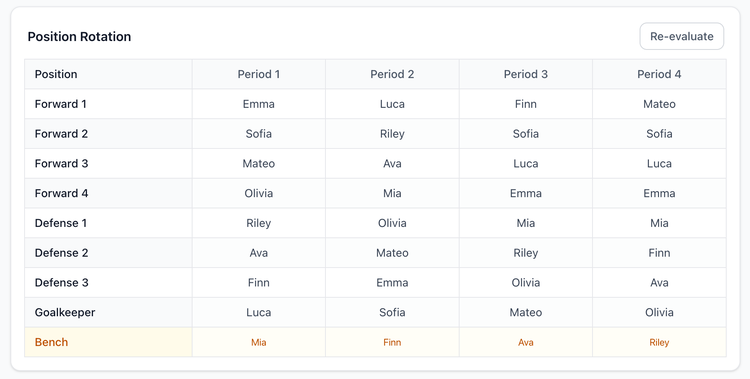
Soccer: position rotation with goalkeeper fairness built in.
GameCard builds a fair position rotation for every segment of the game, covering defender, midfielder, forward, and goalkeeper. The goalkeeper slot gets special handling: it tracks who's played GK and spreads the duty fairly across all willing players, automatically.
Set which players are eligible for goalkeeper once on their profile. Players who don't want to play keeper are never put in goal, while the rest rotate through it fairly.
Works for every format: 5v5, 7v7, 9v9, and 11v11.
Use your lineup from the dugout.
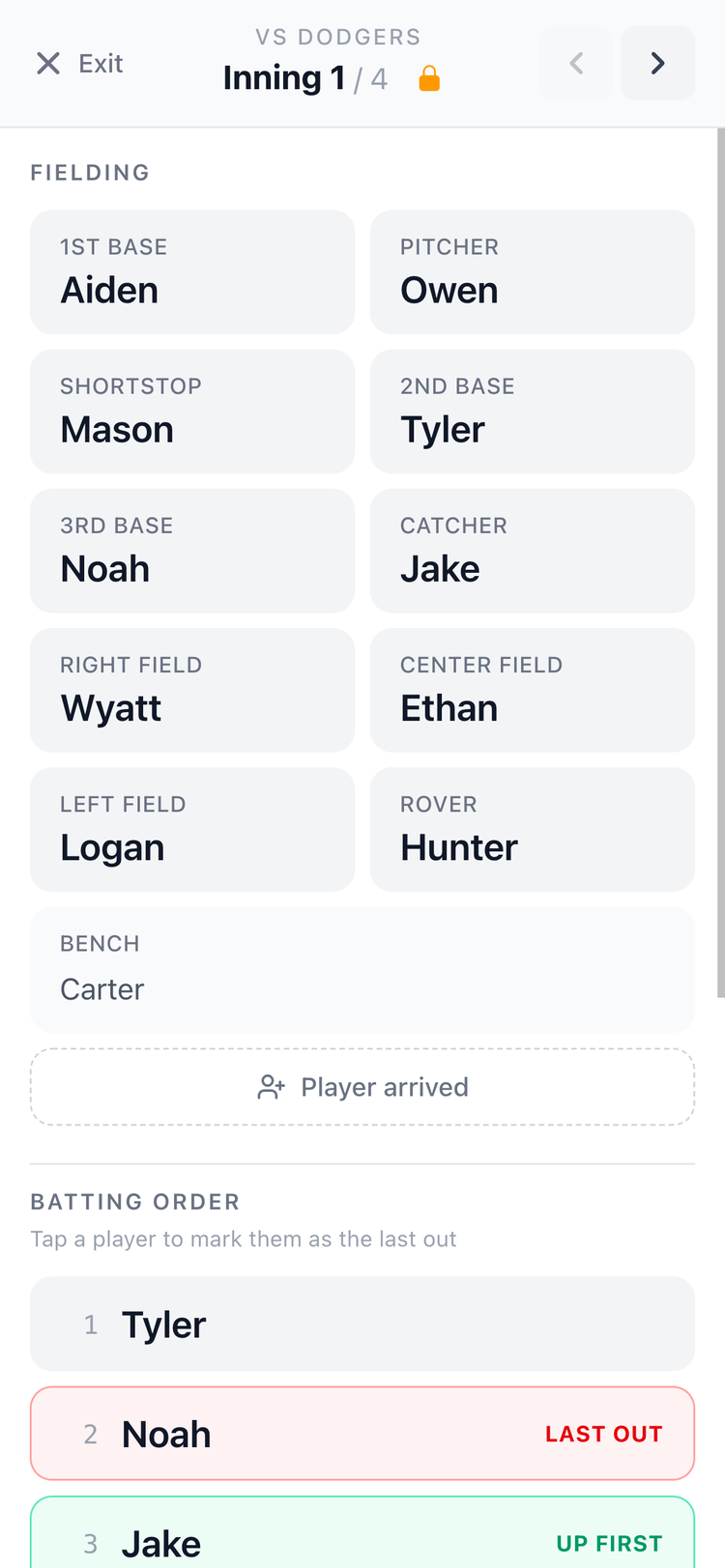
Tap Live on any game to open In-Game Mode, a full-screen, big-text view built for the dugout or touchline. No clipboard. No printed sheet that blows away in the wind.
Navigate between innings or rotations with arrows. The batting order is always visible below the fielding grid. Tap a player to mark the last out and automatically highlight who's up next.
Tune the algorithm to match your coaching philosophy.
Bench Rotation
Position Repeat
How the lineup generator works.
1. Set up your players
Add players to your roster. For each player, set which positions they're eligible for, their fielding rank, and their hitting rank. This information drives every lineup GameCard generates.
You only do this once. The rankings carry through every game of the season.
2. Mark Attendance
Before each game, uncheck any player who isn't coming. The fielding rotation and batting order automatically update around who's actually there. Mark a player absent or add them back mid-game and the remaining rotations re-evaluate in seconds.
3. Your lineup is generated automatically
GameCard generates the complete lineup when you save the game, with no button to tap. The algorithm uses your player rankings, position eligibility, and any performance updates to determine the best placement for each spot. If you've logged performance updates on a player's profile, hit re-evaluate any time to reflect those in the current lineup.
4. Adjust and re-evaluate
The batting order can be reordered by dragging players directly on the game page. Your changes carry forward into future games.
For the fielding rotation, adjustments work through the player profile: update a player's positions, rankings, or performance notes, then hit re-evaluate to regenerate the rotation with the new information factored in.


Lineup generator questions.

Stop building lineups by hand.
Set up your roster once. GameCard generates every lineup from there, fair, balanced, and ready in seconds. Free to start, no credit card required.